Currency and the NBP rate
You issue the invoice in one of eighteen currencies, and the app pulls the rate from NBP table A — for the day before the VAT obligation arises. You can also enter the rate by hand.
You send your client's invoice to KSeF — the UPO comes back and stays with the document. The revenue goes into the ledger, and out of that come the monthly ryczałt advance and the annual JPK_EWP you file with the tax office. A B2B contract is the example here, not the limit: the same month closes exactly this way for any micro-firm on the ryczałt, whatever the trade.
Signing up takes a few minutes; after that you watch the rest happen on your own documents.
A month on a B2B contract is usually one invoice and a few clicks around it — from your client's invoice to closing the year.
You send the invoice to KSeF in one click — the transmission status and the UPO stay with the document. Turn the automation on and it goes the moment you issue it; that switch is off by default.
Sales invoices build the revenue ledger, at the rate set for the company. Advance invoices (ZAL) and proformas do not count as revenue, and a correction is settled at the rate of the period it corrects.
The app works out the advance from your ledger, running from January, after subtracting the contributions marked as paid: the social contributions in full and half of the health contribution. The month's own contributions are worked out on a separate ZUS screen.
You file the annual JPK_EWP by 30 April of the next year. The file is built from your ledger, validated against the Ministry of Finance XSD schema, and you click send and collect the UPO — nothing happens on its own.
The rate is not a choice — it follows from the PKWiU classification, and services tied to software are listed there explicitly at 12%; where it is unclear, an individual tax ruling settles it. In Biurko you enter the settled rate with the date it takes effect, and every month is settled at the rate in force that month; move that date back and the months already closed are recalculated.
All new sales in a given period are settled at a single rate. If part of your work is settled at 12% and part at 8.5%, the app will not split that for you — you work it out elsewhere.
VAT registers and the JPK_V7 exist only if you are a registered VAT payer. If you are exempt, the whole chain above — ledger, advance, annual JPK_EWP — works without them.
Ryczałt 12%, full ZUS with the health contribution, no business costs. The full calculator compares four ways of being taxed and an employment contract at the same cost to the employer.
15,811 zł
left every month
189,733 zł over a year
An informational estimate, not tax advice.
Open the full B2B calculatorA B2B contract rarely stops at a Polish client. An invoice in a foreign currency, in a foreign language and with the right procedure marker is the norm on this route, not the exception.
You issue the invoice in one of eighteen currencies, and the app pulls the rate from NBP table A — for the day before the VAT obligation arises. You can also enter the rate by hand.
Net and gross totals stay in the invoice currency, and the VAT amount is additionally printed in złoty. The rate, its date and the NBP table number all go into the FA(3) XML sent to KSeF.
You issue the document in one of ten languages — from English and Ukrainian to Lithuanian. You pin the language to the contractor for good, whatever language you work in yourself.
You set the “Odwrotne obciążenie” / “Reverse charge” note yourself — the app does not infer it from the contractor's country. Exception: at the “oo” or “zw” rate, the marker appears automatically.
You file the VAT-UE recapitulative statement outside Biurko, you check the contractor in VIES yourself, and you settle exchange-rate differences between issue and payment elsewhere — none of that is here.
Not everyone working in Poland on a B2B contract thinks in Polish.
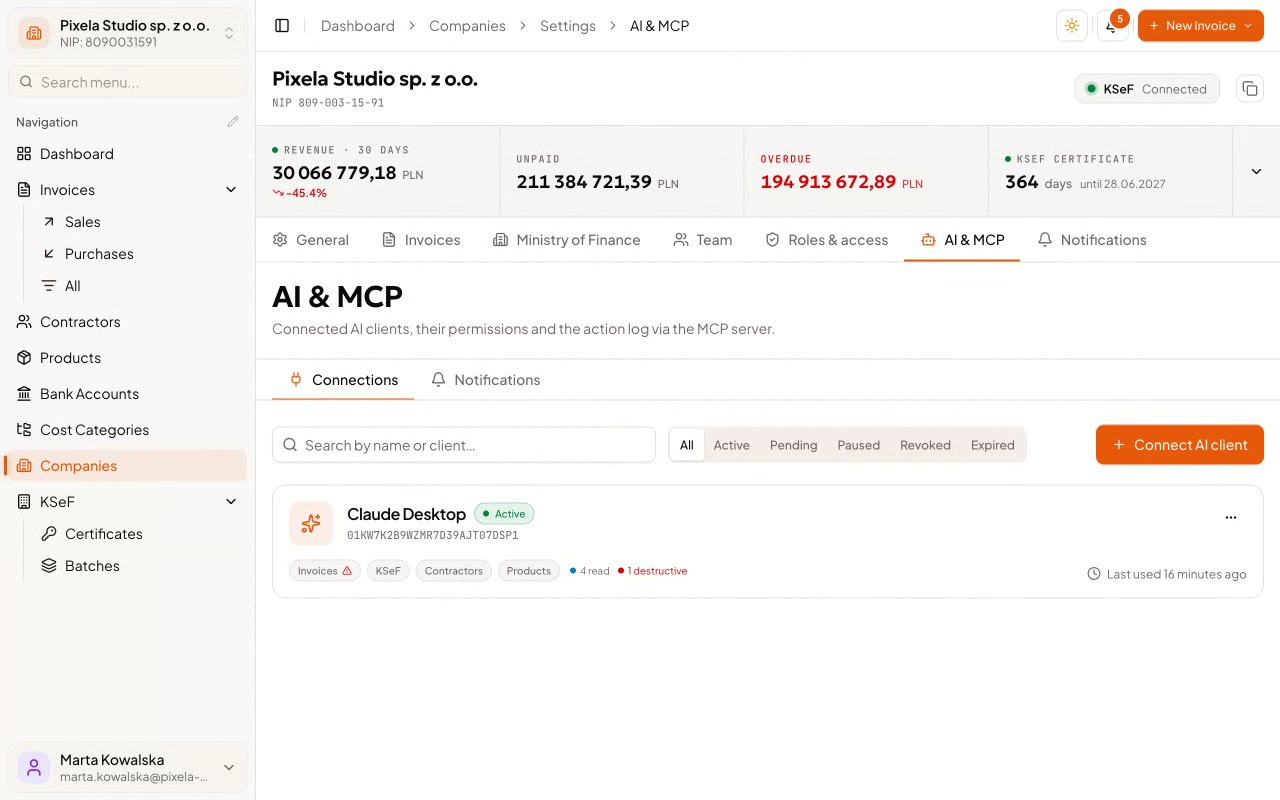
You connect an assistant to your company over the open MCP protocol — it gets more than a hundred tools, the same operations you click yourself: contractors and the catalogue, costs and registers, issuing an invoice, sending it to KSeF and collecting the UPO.
The assistant token gets at most a subset of your own permissions — never more than you have yourself
Every call lands in the audit log — who, what, when, with what effect and from which address — and irreversible actions need a preview and a one-time confirmation
You suspend or revoke access at any moment, and sensitive actions send you a notification
A B2B contract is more than a bigger number on the invoice. Here we set out the questions that come up most: what your ryczałt rate follows from, how the health contribution is worked out, and what you file once a year.
From the invoice to closing the year: what a tax month looks like in a one-person firm.
Where the ryczałt rate comes from, why borderline work stays unsettled, and how the rate works in the app.
Three brackets instead of a percentage: what comes off revenue first, and what still lands on you.
How JPK_EWP differs from JPK_V7, what goes into the file, and why you start the submission yourself.
What the 5% rate really covers, why ryczałt rules it out, and where the UD116 bill stands.
Looking after a one-person IT firm costs roughly 159–404 zł a month at an accounting firm — the market rate for someone's time and someone's responsibility. Biurko is not trying to talk you out of that: it takes over the retyping and leaves your accountant the part no software can take on.
And if you are the accountant, reading this over your client's shoulder: your client stays yours. You come in as a guest, on a seat nobody pays for, and you get clean data — registers and JPK files instead of a folder of scans.
No marketing fluff: what the app works out, what it does not, and where its role ends.
It will. The base is the revenue from your ledger, less the contributions you have paid — the social contributions in full and half of the health contribution, counted by the day the money left the account. The app runs a total from January and subtracts the ryczałt already owed for earlier months. It reduces the advance only by what you mark as paid — it will not guess at a transfer you have not marked.
The whole ryczałt track: the revenue ledger from your invoices, the monthly advance worked out from it, and the annual JPK_EWP you send to the tax office straight from the app and collect the UPO for. No VAT registers or JPK_V7 there — they exist only for a registered VAT payer, and while you are exempt the app blocks filing them.
You choose from eighteen currencies, the app pulls the rate from NBP table A for the day before the VAT obligation arises, and prints the VAT amount in złoty too; the rate, its date and the table number go into the FA(3) XML. You set the “Reverse charge” note yourself. You file the VAT-UE recapitulative statement outside Biurko, and you check the contractor in VIES yourself.
Yes, if you let it. You connect the assistant over MCP and decide yourself how much it may do: its token gets at most a subset of your own permissions. Every call is written to the audit log, irreversible actions need confirmation, and you revoke access at any moment.
Biurko works your ZUS contributions out and deducts them from revenue, and it prepares the DRA: a KEDU file or a printout on the official form. What it does not do: send the declaration to ZUS, sign it, or touch your eZUS account — you file it yourself, by file or on paper. We do not yet work out the annual health-contribution settlement, and the annual PIT-28 you fill in yourself or with an accountant. Today we work contributions out for a sole proprietorship on the ryczałt.
Not in the way that question usually means. The app removes the retyping — from you, and if you work with an accountant, from them too: the ledger comes out of invoices, not a binder. Your accountant comes into your company as a guest, on their own free seat outside the plan limit, and pulls the data themselves. Knowing your industry, reading the law and answering for both is something no tool takes on — and we do not promise it either.
Sending to KSeF is only the way in — what you pay for is what happens after the invoice. Open a free account, issue your first invoice, and see your month from the inside.
No onboarding project and no call with a salesperson — you issue your first invoice the same day.
We use only essential cookies. Visit statistics are kept on our server, with nothing saved on your device. Website Policy